
Finding Images for Your Website
As I’ve continued to work on the physics portion of this site, I’ve encountered some difficulties with finding images. Â Back when I first started biologycorner.com, clip art sites and image resources were everywhere. Â It was almost as if the internet of 1996 existed solely to supply clipart to the masses. Â In fact, many of the images on biologycorner.com came from sites that no longer exist.
Now, when I look for clip art, I find myself consistently looped back to sites that require pay subscriptions, or in some cases a single fee to license an image for a site. Â There are still some places out there that only require a link back if you use their images, but they seem to be hidden in the massive amount of pay sites that google has top rankings on. Â Â I’ve listed a few of my favorite sources in the Images Section of this site.
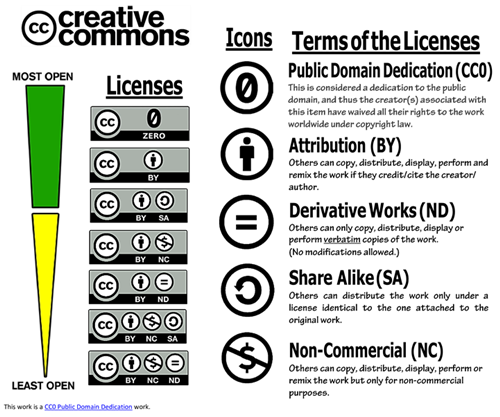
Another source I’ve found is flickr, though you do need to be cautious about using images there. Â Not all of them are licensed as CC (creative commons). Â To get the little images on the physics page that go with the topics, I used a flickr search tool to help locate only those images that are CC licensed. Â As an aside, you can also license your own work with this method. Â The Creative Commons website has information on how the license works and what kinds of licenses you can choose for your own work. Â Incidentally, this site’s resources are licensed under this type of copyright.
The tool I use to search for images for the new physics site is Compfight, though you must choose to only search for images with a CC license. Â What type of images you are looking for should guide your search terms, but this can also be a difficult and time consuming process. Â For the next section of my site, a chapter on work and energy, I started with a search for tools. Â Apparently, not many people take pictures of their tools and the ones that I did find were boring, static images. Â Since I want the physics site to illustrate the dynamic and exciting world of physics, I need to find images that “move”. Â I had to think of what type of tools qualify and decided to look under heavy equipment. Â This yielded images of tractors and cranes more exciting images. Â I chose a picture of a crane from the image list, and a click took me to the photographers flickr site where I could get his information. I need his name and photostream address to properly attribute the photograph when I post it. Â It is also considered a courtesy within the Flickr community to let the photographer know that you are using the image. Â Here’s a tip for images you download from flickr. Once you have the image on your computer, right click and go to properties; Â in the “comments” tab, paste the photographer’s flickr link. Â Â I made the mistake of not doing this at first, and ended up with a pile of photos that I could not find their photographer information to give them credit.
Now if you go to the biologycorner.com/physics/ you can see that each of the photographs I’ve used has a flickr credit underneath it. Â I’ve uploaded a few pictures of my own to flickr, you can view my photostream to see random pictures of classrooms, labs, students, and of course, my dog. Â If you are going to use flickr as an image source, I encourage you to post a few of your own to share with others, even if you think its a silly picture, post it anyway. Â I am constantly looking for the obscure image to go along with some weird worksheet or resource.
June 30, 2010
·
smuskopf ·
Comments Closed
Posted in: Best Practices